AI receptionist for UK small businesses
Every call deserves
a professional answer.
A friendly AI receptionist answers when you can't, takes a useful message, and helps you get back to the people who need you.
14 days free · No card needed · Keep your existing business number

01Your existing business number
02Your greeting and instructions
03A message you can act on
The handover
You can't pick up.
That's where we come in.
No new number for your customers to learn. No app for them to download. Just a helpful voice at the other end.
- 01
Tell us about your business.
Add your greeting, hours and common questions. Tell the receptionist which details to ask for.
- 02
Forward the calls you miss.
We assign you a LatchCall number. Use the instructions in your dashboard to divert calls when you are busy, unavailable or closed.
- 03
Read the message. Call back.
Read the complete conversation transcript, caller's details and summary in your dashboard. The owner can separately opt in to transcript email.
Optional built-in calendar
A time that works.
A booking you approve.
When a caller asks for an appointment, LatchCall checks your calendar and takes a request. Set your services, each person's working hours, and block out time when you're not available.
- 01. Check availability. The AI offers times that fit your staff and service.
- 02. Verify the email. The caller clicks a link and confirms their request.
- 03. You approve. Availability is checked again before confirmation.
No time is held while a request is waiting. Nothing is confirmed without your approval.
Try it with your receptionist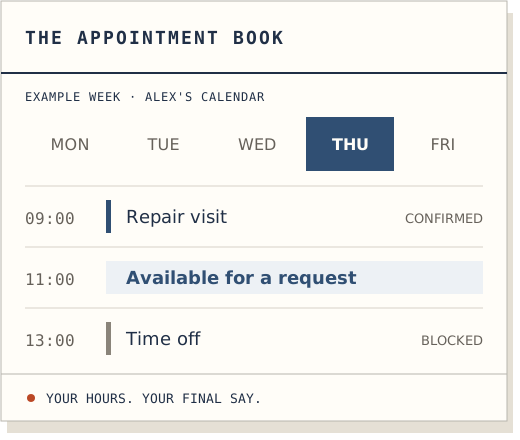
A receptionist. Not a replacement for you.
The small details
are the whole point.
You know the job. LatchCall makes sure you know who called about it.
- Asks the right questions
- Name, callback number, reason for calling, and the extra details you choose. Confirmed back to the caller.
- Uses your business information
- Answers from your hours, FAQs and approved website information. If it doesn't know, it takes a message rather than inventing an answer.
- Flags what needs attention
- Urgent messages are marked so you can see which callbacks to look at first.
- Keeps the conversation in your dashboard
- The transcript stays in your signed-in dashboard by default. The owner can opt in to transcript email and configure authorised recipients.
The monthly bill
An extra pair of hands.
Not another salary.
Start with 14 days free, without a card. Every plan includes your UK forwarding number, custom call flow, summaries and transcripts.
Cytron Limited is not VAT registered; the plan prices shown are the total charged by Cytron. Forwarding charges may apply with your phone provider. We allow an extra 20% of your minutes before pausing call answering until the next billing period.
Before you hand over
Fair questions.
Straight answers.
Do I need to change my business number?
No. Keep the number your customers already know and forward unanswered, busy or after-hours calls to your dedicated LatchCall number. Your dashboard shows the forwarding instructions. Your phone provider may charge for forwarded calls.
Is this a human receptionist?
No. LatchCall is an AI assistant with a natural voice. It tells callers it is AI and that the call may be transcribed to handle their enquiry. Callers who do not want to continue can decline and use another way to contact your business.
Can I decide what it says and asks?
Yes. Set your opening hours, greeting, common questions and extra instructions. Choose the caller details you want collected. Changes apply to the next call.
Where do my messages go?
By default, the transcript, summary and callback details are available in your signed-in dashboard. The account owner can separately opt in to transcript emails to their login address and configured recipients. Only add people authorised to see caller information; turning email off cannot recall messages already sent.
Can it handle appointment requests?
Yes, if you enable the calendar. Add your services, staff working hours and blocked time. The receptionist checks availability, then emails the caller a verification link. No time is held: the caller must verify their email and you must approve the request before an appointment is confirmed.
What happens when my trial or minutes run out?
Your free trial lasts 14 days. Choose a paid plan to keep calls being answered after it ends. On a paid plan, we keep answering for an extra 20% of your allowance; after that, callers are asked to call back until your next billing period. You can manage your plan in the billing dashboard.
For the next time your hands are full
Leave the ringing to us.
Try your AI receptionist free for 14 days. No card needed.